
Projectors have been a cornerstone of visual display and entertainment for decades. Whether for business presentations, home theaters, or educational purposes, projectors bring the bigger picture into our lives. But what happens when you want to project that picture on a black wall? It’s a valid question, and the answer is more nuanced than simply “yes” or “no”. Delve into the intricacies of projection technology, the impact of wall color on image quality, alternatives for dark walls, and valuable tips on improving projections in non-standard environments.
Types of Projectors
Traditionally, consumers have had the choice between three primary types of projectors:
LCD Projectors
LCD (Liquid Crystal Display) projectors operate by passing light through three LCD panels, each dedicated to the red, green, and blue components of the image. This process allows for precise control over color accuracy, resulting in incredibly vibrant and lifelike visuals. Renowned for their exceptional brightness and sharpness, LCD projectors have become immensely popular in various applications, from home theaters to professional presentations. Their ability to deliver stunning image quality has made them a preferred choice for those seeking an immersive viewing experience.
DLP Projectors
DLP (Digital Light Processing) projectors utilize a digital micromirror device (DMD) chip comprising millions of minuscule mirrors. Each mirror corresponds to an individual pixel in the projected image, meticulously tilting to either reflect light towards or away from the screen. This cutting-edge technology is widely acclaimed for its exceptional contrast ratio and efficiency, which leads to incredibly sharp and vibrant images, particularly in settings with varying levels of ambient light.
LED Projectors
LED projectors are a versatile subset of both LCD and DLP technologies, incorporating the use of light-emitting diodes (LEDs) as a replacement for traditional lamps. These innovative projectors not only offer the advantages of longer lifespans, lower heat generation, and increased energy efficiency, but they also provide exceptional color accuracy and image quality. With their superior brightness and contrast ratio, LED projectors excel in displaying vibrant and detailed visuals, making them an ideal choice for environments with black walls where image clarity and sharpness are paramount.
Impact of Wall Color on Projection
The color of the wall onto which a projector beam is directed can significantly alter the final image. Light-colored walls tend to reflect more light, which is not always ideal in environments where controlling light spill is important. Black walls, on the other hand, absorb light, potentially affecting overall brightness.
The contrast ratio, or the difference between the brightest whites and the blackest blacks, is a critical factor in image quality. When you project onto a black wall, the absorption of light means that the black levels of the image may not appear as dark as intended, and the whites may not seem as bright. This can lead to a perceived decrease in contrast, making the image look muddy or flat.
To combat this effect, projectors designed for home theater enthusiasts often include features like dynamic contrast and black level adjustments to help maintain image integrity on non-standard surfaces.
Alternatives for Black Walls
If you prefer the aesthetic of a dark room but don’t want to compromise your projector’s image quality, you have a few options at your disposal.
Painting the Wall
One option to enhance your projector setup is to paint the wall with specialized projector screen paint. These innovative paints are specifically designed to preserve image quality, ensuring vibrant colors, precise color accuracy, and optimal contrast, even on darker surfaces. With a wide range of shades available, you can select a tone that perfectly complements the room’s aesthetics while maximizing your projector’s performance. By utilizing this advanced paint technology, you can create an immersive viewing experience that brings your movies, presentations, and games to life in stunning detail and clarity.
Using Projection Screens or Materials
When it comes to projection screens or fabric materials, they are specifically designed to deliver exceptional image quality. While a traditional screen may be the go-to option for most, there are also portable screen materials that offer flexibility, allowing for temporary mounting or easy retraction when not in use. For those seeking top-notch performance, investing in premium screens is highly recommended. However, it’s important to keep in mind that achieving the best results often entails investing in quality materials that are built to last.
Tips for Improving Projection on Darker Surfaces
If painting the wall or purchasing a screen isn’t an immediate option, there are several steps you can take to enhance the projection experience on a dark wall.
Optimal Projector Settings
Ensure that your projector is set to its best display mode. Many projectors offer a “cinema” or “theater” mode that is calibrated for dark environments and may include settings tailored to increased contrast and color accuracy.
Lighting Considerations
Control the ambient light in the room to the best of your ability. In a dedicated home theater, minimizing light sources is standard practice. However, if you don’t have complete control over the lighting, consider light-shielding options like blackout curtains or shades around the viewing area.
Placement and Positioning Techniques
The distance and angle of the projector relative to the wall can affect the final image. The projection should be as perpendicular to the wall as possible to minimize distortion. Also, experiment with different distances to find the sweet spot for image sharpness and size. By following these tips, you can make your projector perform admirably even on black walls.
How To Use A Projector On A Black Wall?
Prepare the Wall
Before setting up your projector, it is crucial to ensure that the wall you are using is not only clean but also free from any dust, dirt, or imperfections that may potentially impact the overall image quality. Take the time to thoroughly inspect the wall surface, and if needed, consider applying a fresh coat of specialized screen paint to further enhance the visual experience and achieve optimal results. By paying attention to these finer details, you can create a truly immersive viewing environment that brings your content to life.
Dim the Lights
To achieve the best results in any visual task, it is absolutely essential to have complete control over the ambient light in the room. By dimming or turning off any unnecessary lights, you can effectively reduce glare and enhance contrast, resulting in improved color accuracy and overall visual experience. This attention to detail ensures that every detail is seen with utmost clarity and precision.
Position the Projector
To achieve the best image quality, it is important to carefully position the projector at an appropriate distance and angle. Ensure that the projector is perpendicular to the wall, as this will help maintain the correct geometry of the projected image. Additionally, experimenting with different distances can help determine the optimal projection size and sharpness, allowing you to fully enjoy the visual experience.
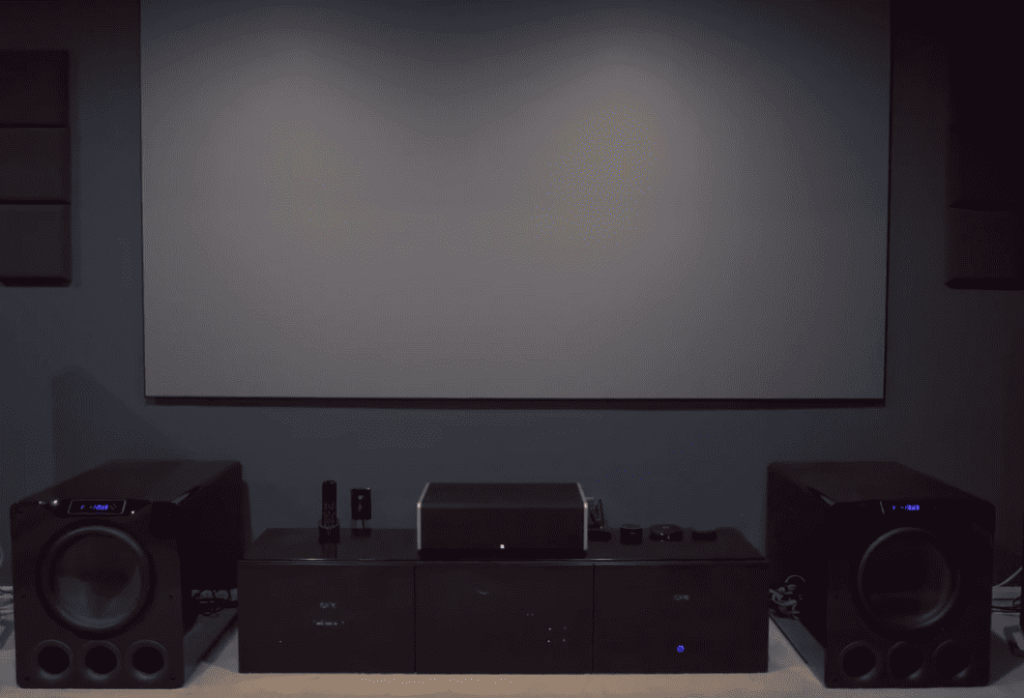
Select Brightness Mode
When it comes to projectors, you’ll find that most of them offer a range of display modes tailored for different environments. For those cozy movie nights in dark rooms, it’s recommended to select the cinema or theater mode. This particular mode is usually calibrated to ensure the best image quality, specifically designed to enhance your viewing experience in low light conditions. So sit back, relax, and immerse yourself in the captivating visuals that the cinema mode has to offer!
Adjust Brightness and Contrast
If your projector has settings for brightness and contrast, make sure to adjust them accordingly. Darker walls absorb light, so increasing the brightness and contrast can help maintain image clarity and prevent a decrease in contrast.
Check Image Size and Focus
Before you begin your presentation or movie, it is crucial to double-check the image size and focus. This will ensure that you have a crisp and clear picture, leaving a lasting impression on your audience. Take a moment to adjust the zoom and focus functions of the projector if necessary, allowing for optimal viewing experience. By paying attention to these details, you can enhance the overall quality and impact of your visual content.
Fine-Tune Colors
If your projector has color settings, you can fine-tune them to achieve the best image quality on a black wall. By experimenting with different color levels, you can find the optimal balance for vibrant and accurate colors that will bring your visuals to life. Adjusting the color saturation, contrast, and brightness can further enhance the viewing experience, allowing you to enjoy stunning images with rich color depth and clarity. Take your time to explore the various settings and make adjustments until you achieve the perfect combination that suits your preferences and the content you are projecting. With a little extra effort in optimizing the color settings, you can create a truly immersive and visually captivating experience for yourself and your audience.
Consider Using a Screen or Material
For a more professional and immersive projection experience on a dark wall, it is worth considering investing in a specialized screen or fabric material that is specifically designed for projectors. These high-quality materials not only enhance the image quality but also contribute to a superior viewing experience. With a wide range of sizes and styles available, you can easily find the perfect fit to suit your specific needs and preferences.
Whether you are setting up a home theater or delivering impactful presentations in a corporate setting, these specialized screens or fabrics will elevate the overall visual impact, ensuring that every detail is crisp and clear. So, take your projection setup to the next level by opting for these purpose-built materials, and enjoy the enhanced quality and professionalism they bring to your viewing or presentation sessions.
Control Ambient Light
Lastly, if possible, it is beneficial to control any remaining ambient light in the room with effective light-shielding options such as blackout curtains or shades. By implementing these measures, you can further enhance the image contrast and clarity on a black wall, creating an optimal viewing experience that truly immerses you in the visual content.
Benefits of Using a Black Wall for Projecting
Using a black wall for projecting has several benefits that can significantly improve your viewing experience.
- Enhanced Contrast: A black wall absorbs light, allowing the projected image to stand out and appear more vibrant. This heightened contrast results in improved color accuracy and image clarity, making the visual content more engaging and impactful.
- Immersive Experience: The absence of any distracting colors or patterns on a black wall creates a seamless and immersive experience, allowing you to fully immerse yourself in the visuals without any distractions.
- Cost-effective Solution: Using a black wall for projecting eliminates the need to invest in expensive screens or materials, making it a cost-effective solution for creating an optimal viewing environment.
- Versatility: Black walls are versatile and can be used for various purposes such as home theater setups, presentations, or even gaming. This flexibility makes it a practical and convenient option for projecting in different settings.
- Easy to Set Up: Setting up a projector on a black wall is relatively easy and hassle-free compared to setting up specialized screens or materials. It is also more forgiving in terms of positioning and angle, making it an ideal option for beginners or those who want a simple and straightforward setup.
In conclusion, using a black wall for projecting can greatly enhance your viewing experience by improving contrast, clarity, and immersion. With the right adjustments and considerations, you can easily transform any dark room into an optimal projection environment that allows you to fully enjoy the visuals in all their glory.
How to Get High Brightness from a Black Wall?
While using a black wall for projecting offers several benefits, achieving high brightness levels can be a challenge. Here are some tips to help you get the most out of your projector on a black wall:
- Use a High Lumens Projector: Investing in a high lumens projector can significantly increase the brightness levels on a black wall. The higher the lumen rating, the brighter the image will appear on a dark surface.
- Adjust Brightness and Contrast: As mentioned earlier, adjusting the brightness and contrast settings on your projector can help improve image clarity and maintain brightness levels on a black wall. Experiment with different levels until you find the optimal balance for your setup.
- Choose a Short Throw Projector: A short throw projector is designed to project from a shorter distance, making it an ideal choice for projecting on a black wall. This allows for more light to be reflected back onto the screen, resulting in higher brightness levels.
- Consider Using an Ambient Light Rejecting Screen: If you are willing to invest in a specialized screen, consider getting an ambient light rejecting screen designed specifically for projectors. These screens have enhanced reflective properties, allowing for brighter images even in well-lit rooms.
By implementing these tips, you can achieve high brightness levels on a black wall and fully maximize the potential of your projector. Experiment with different techniques and see which combination works best for your setup to create an optimal viewing experience.
FAQ
Will a projector show on a black wall?
Yes, when using a projector to display images on a black wall, it is crucial to carefully adjust the brightness and contrast settings. By fine-tuning these settings, you can achieve optimal image clarity, ensuring that the projected content appears vivid and sharp. Taking the time to make these adjustments will greatly enhance the overall viewing experience, providing you with the best possible image quality and brightness levels.
Can you use any color wall as a projection screen?
While you can technically project onto any colored surface, using a black wall allows for better contrast and image clarity compared to other colors. Additionally, other colored walls may cause a color cast on the projected image, altering its accuracy. Therefore, it is recommended to use a black wall for projecting to achieve the best results. However, if using a black wall is not an option, you can use specialized projection screens or materials designed for optimal image quality and brightness levels.
Is a projector better on white or black wall?
As mentioned earlier, a black wall allows for better contrast and image clarity compared to a white or colored wall. This is because a black surface absorbs light, preventing any interference with the projected image. However, if you have a high lumens projector and proper adjustment settings, you can achieve good results on a white or colored wall as well. Ultimately, it depends on personal preference and the quality of your projector. So, it is recommended to experiment with different surfaces and settings to find what works best for your setup.
What color wall is best for a projector?
A black wall is considered the best option for projecting due to its ability to absorb light and enhance contrast. However, if using a black wall is not possible, using specialized projection screens or materials can also provide optimal image quality and brightness levels. It is important to carefully adjust the projector settings and experiment with different surfaces to find what works best for you. So, there is no one “best” color for a wall when it comes to projecting, and it ultimately depends on personal preference and the quality of your setup.
Conclusion Paragraph
Projecting on black walls can be a challenge, but with the right considerations and adjustments, it is possible to achieve a satisfying visual experience. Projector technology continues to evolve, providing solutions for various installation scenarios. While your preferred wall color may not be the most conducive to projection, there are always ways to optimize and enjoy the magic of the big screen at home. A balance of technology, proper setup, and environmental factors will ensure that wall color becomes just a footnote in your immersive viewing experience.